TRON ENERGY · LIVE

EZ ENERGYTRON energy rental

Rent Energy for a single USDT TRC-20 transfer from your own wallet.

LIVE / CURRENT PRICE Updated automatically
Why is there a difference?
65 000 ENERGY — TRX Recipient already has USDT
Estimated saving—
Estimated network burn— With EZ Energy— TRX
RESOURCEENERGY
NETWORKTRON
ACCESS24 / 7
Services

TRON Energy rental

Rent Energy for a single USDT TRC-20 transfer from your own wallet.

Rent Energy

Who it is for

For people sending USDT from Trust Wallet, TronLink or another wallet who want to reduce network fees.

How to use it

Estimate the amount, order Energy for the sender address and wait for delegation. Then send USDT from your wallet.

What to check

Energy does not cover Bandwidth. TRON may burn TRX when resources are insufficient.

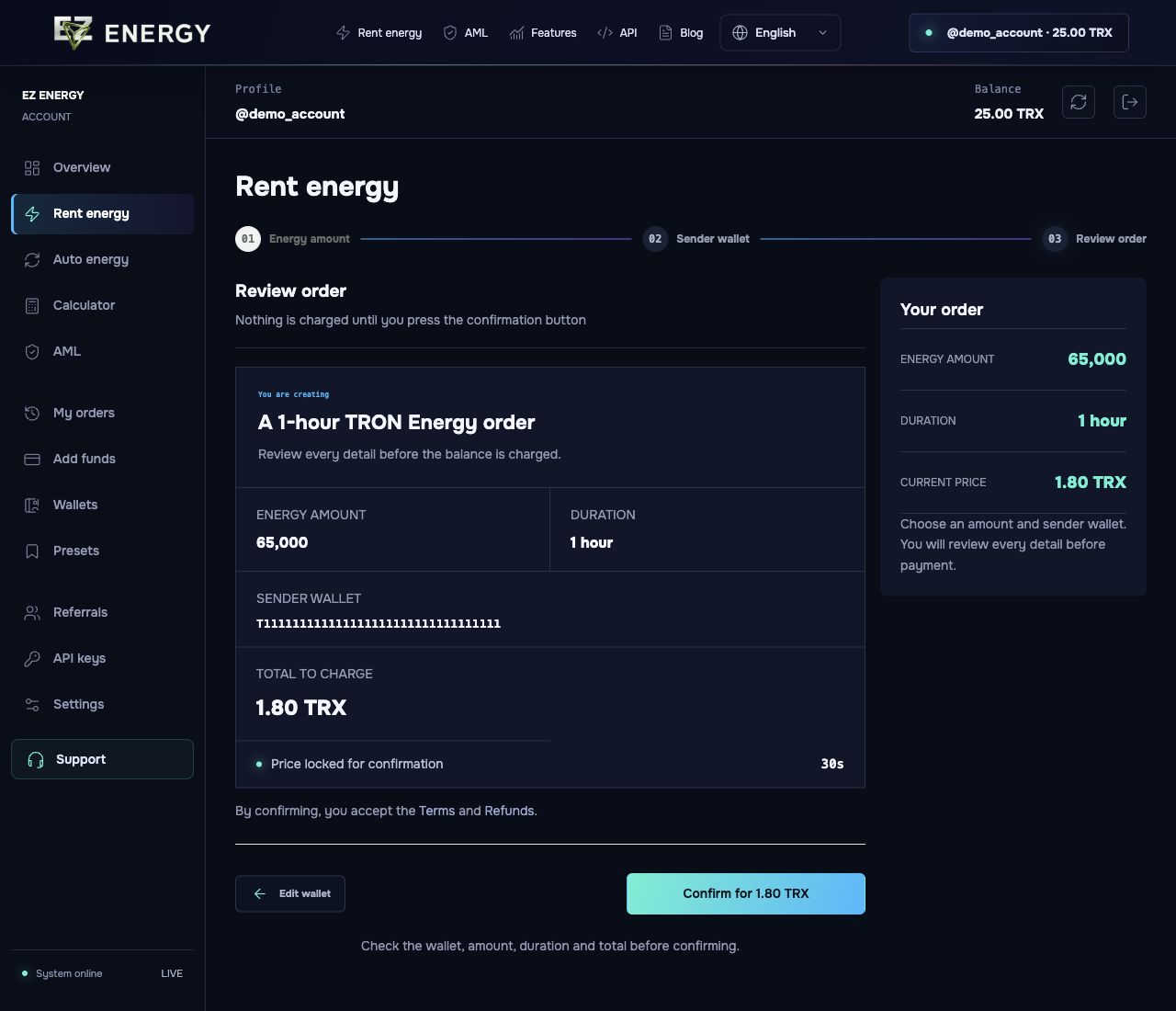
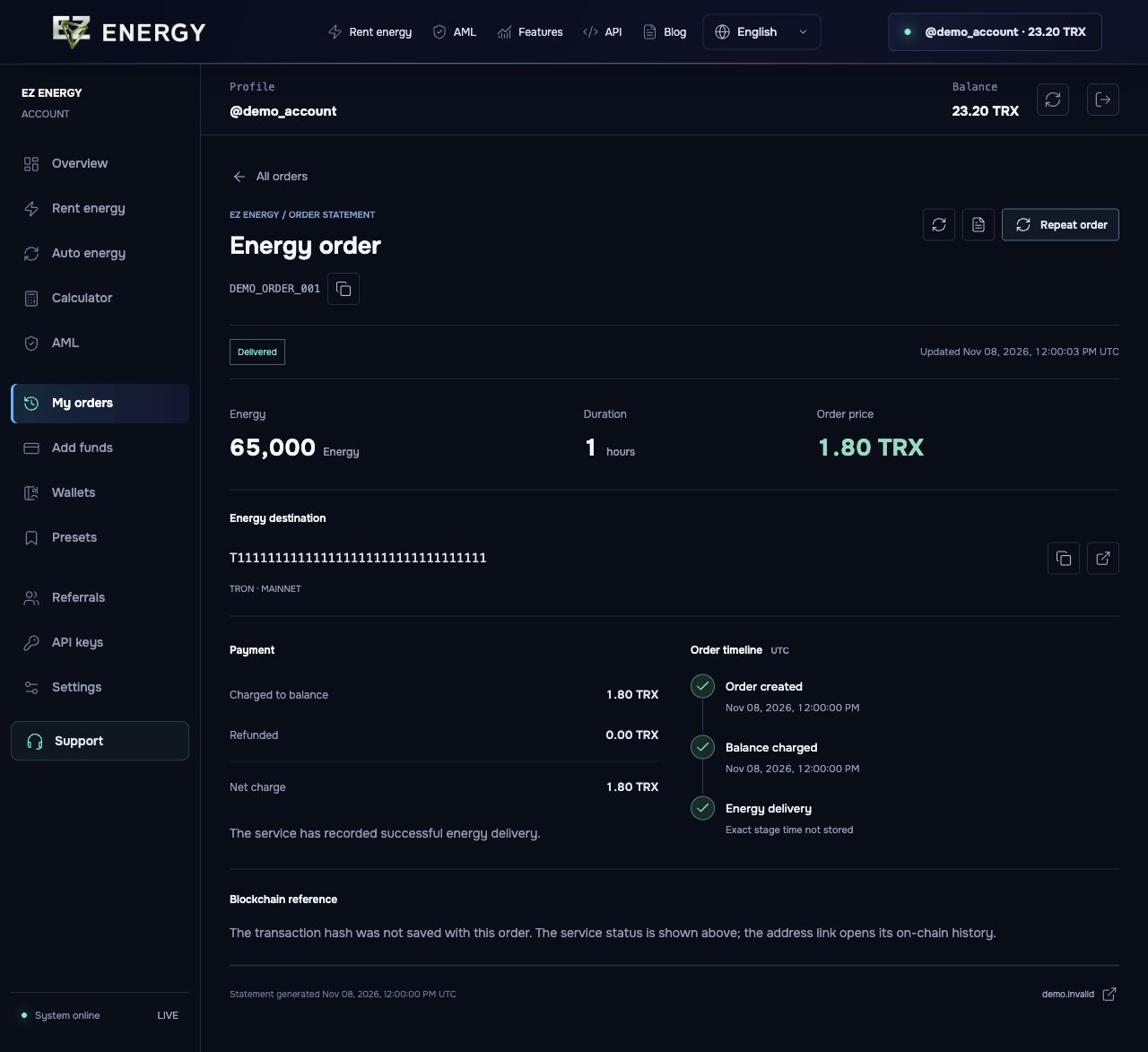
Screens from the account

English demo. The prices and data shown are examples.

Before confirming, review the sender address, Energy amount, rental duration and total in TRX.
Order details show delivery status, the amount charged and a transaction link when available.

Which address goes into the rental order?

Suppose you are sending USDT from Trust Wallet. Use the recipient address to estimate Energy, then rent it for your own sending address. The sending wallet signs the transfer and spends the Energy.

Why does the wallet still show a fee?

Check that the order was delivered and verify the sender’s available Energy on TRON. Reopen the transfer preview. If Energy is sufficient, check Bandwidth and any separate wallet fees. Renting Energy does not make every transfer free.

How do I rent Energy for multiple wallets?

Open the multi-address rental form in the account. Enter Energy per wallet, paste the addresses and review the combined quote. After confirming, track each address separately. If the batch stops, check which orders already exist before trying again.

ENERGY DELIVERYAML SCREENINGLIVE PRICING PUBLIC APIREFERRAL PROGRAMSAVED WALLETSQUICK PRESETS
DELEGATED — ENERGY
COMPLETED — ORDERS
CLIENTS — WITH PURCHASES
SAVED — TRX
ENERGY DELIVERED IN 24 HOURS — ENERGY / 24H
LIVE / CURRENT PRICE

Transaction price, before you sign in.

Updated automatically
65 000 ENERGYPOPULAR

Recipient already has USDT

from1.93TRX
Estimated network burn— TRX Estimated saving—

130 300 ENERGYUSDT

Recipient has zero USDT

from3.88TRX
Estimated network burn— TRX Estimated saving—

Compare prices before you rent

65,000 Energy · 1 hour · selected services

1.93 TRX29.76 SUNCurrent quote14.9% below ITRX
Open comparison
ACTUAL PRICE DATA

Price history

Recorded 65,000 Energy quotes across three calendar days, by UTC hour.

Period minimum
—TRX
Hourly average
—
Maximum
—
Latest quote
—
—65 000 Energy · 1h · UTC
Collecting price history
—
Hourly pricesTRX / UTC
The last recorded quote in each hour. Missing hours stay empty; future prices are not predicted.
TRON / RESOURCE GUIDE

How much energy
does a transfer need?

Energy is delegated to the wallet that sends USDT. The required amount depends on whether the destination wallet already has a non-zero USDT balance.

01Where energy is sentEnter the wallet that will sign and send the USDT transaction. Energy is delegated to this address, not to the USDT recipient.
02What determines the amountThe destination wallet's USDT state changes contract execution cost: an existing non-zero balance normally needs less energy than a zero balance.
03What EZ Energy checksBefore purchase we verify the sender address, activation and current network scenario, then show the exact order total.
01Sender walletReceives energy and signs the transfer
→
02USDT CONTRACTConsumes the delegated resource
→
03Destination walletIts USDT balance affects the reference amount
USDT TRANSFER PROFILE TRON MAINNET
Will the USDT destination have a non-zero USDT balance before this transfer?
REFERENCE AMOUNT 65 000 Recipient already has a USDT balance
Why does it differ?The USDT contract updates an existing token balance record, which normally requires less computation and storage work. Reference, not a guaranteeActual consumption can change with the USDT contract, dynamic energy model and current network state. The order screen checks the wallet and shows the final amount before purchase.
Check my wallet→
TRON / AUTO ENERGY

Energy for every USDT transfer

Pay for a balance of operations once. Energy is supplied to your sending wallet as transfers happen, instead of placing a separate rental order each time.

Open auto energy→ No automatic repeat purchases
Price per operation— TRXMinimum 3 operations
Your activated sending wallet
Energy is supplied as you transfer
Check the balance and pause it anytime

On a day with transfers, at least 3 operations are charged. A pack of 3 may be used after one transfer.

02 / PROCESS

Three steps.
One minute.

The order flow is clear from the first click. You always see the current price before confirmation.

Start an order→
01
Choose the amount

65,000, 131,000 energy or a custom amount.

02
Enter the address

The service checks the wallet before ordering.

03
Confirm

The price is locked before purchase.

READY WHEN YOU ARE

Your energy is ready.

Sign in with Telegram and place your first order.

Rent energy↑
EZ ENERGY ACCOUNT

Sign in

Access your balance and orders.

or use email
Telegram credentials are never shared with the website. Email passwords are stored only as protected hashes.